Final Audit
Review all works, quantities, and prices before exporting your BOQ.
Final Audit
The Final Audit is the last step before export. Xtimo AI reviews your complete BOQ — checking quantities, prices, and structure — and surfaces anything that needs your attention. You can review, fix, or dismiss each item before downloading.
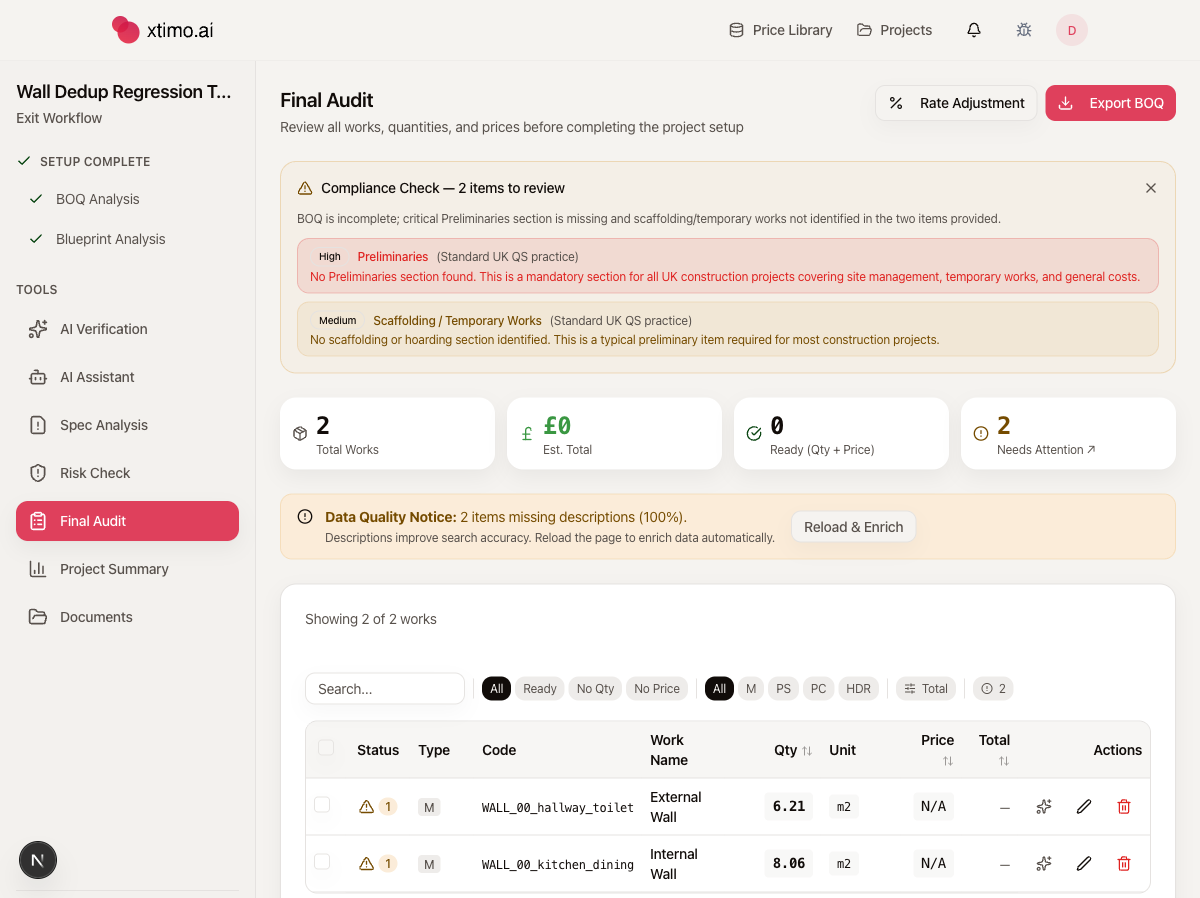
What you see on the Final Audit page
Summary cards
Four cards at the top give you a quick picture of your BOQ health:
- Total Works — total number of line items in your BOQ
- Est. Total — combined estimated value in £
- Ready (Qty + Price) — items that have both a quantity and a price
- Needs Attention — items flagged for review, with a link to filter the table
Compliance Check
A yellow banner appears when Xtimo AI detects structural gaps in your BOQ — things commonly required under standard UK QS practice. Each finding is rated by severity:
- High — mandatory sections missing, such as Preliminaries (site management, temporary works, general costs)
- Medium — commonly expected items not found, such as Scaffolding or Temporary Works
The compliance check helps you identify omissions before the estimate leaves your desk. You can dismiss the banner once you have reviewed the findings.
Data Quality Notice
An orange notice appears when work items are missing descriptions. Descriptions are used by Xtimo AI to search your Price Library — items without them may get no price. Click Reload & Enrich to let Xtimo AI fill in descriptions automatically based on the item codes and context.
The audit table
The table lists every work item in your BOQ with the following columns:
| Column | What it shows |
|---|---|
| Status | A warning icon with a count of issues on that item |
| Type | Item classification — M (Measured), PS (Provisional Sum), PC (Prime Cost), HDR (Section Header) |
| Code | The item code from your original BOQ |
| Work Name | Description of the work |
| Qty | Extracted quantity |
| Unit | Unit of measurement (m2, m, nr, etc.) |
| Price | Unit rate from your Price Library |
| Total | Quantity × Price |
| Actions | Lookup, edit, and delete buttons for that item |
Filtering the table:
- All / Ready / No Qty / No Price — filter by status to focus on items that still need work
- All / M / PS / PC / HDR — filter by item type
- Search box — search by code or work name
Reviewing items
Items with a warning icon have one or more issues. The number next to the icon tells you how many. Common issues include:
- No price found — no matching rate in your Price Library
- Unusual quantity — significantly higher or lower than similar items
- Duplicate items — identical work descriptions appearing more than once
- Unit mismatch — quantity and unit combination appears inconsistent
For each issue you can:
- Edit the item — click the pencil icon to update the quantity, rate, or description directly
- Look up a price manually — click the search icon to find a rate from your Price Library
- Open in AI Assistant — ask the AI to investigate or fix the issue through conversation
Sidebar tools
The left sidebar gives you access to additional tools for the same project:
- AI Verification — Xtimo AI reviews each item and suggests corrections to quantities and prices. You can approve or reject each suggestion individually, with reasoning and benchmark data shown for each.
- AI Assistant — a chat interface to ask questions about your BOQ, fix issues, or generate missing content
- Spec Analysis — checks your BOQ against standard UK QS specification requirements and flags structural gaps
- Risk Check — flags high-risk pricing assumptions or scope gaps that could affect your estimate
- Project Summary — an overview dashboard showing the full estimate, cost breakdown by trade, and confidence indicators
Rate Adjustment and Export
Two buttons appear in the top-right of the Final Audit page:
- Rate Adjustment — apply a percentage uplift or reduction across all rates at once (useful for applying a margin or adjusting for market conditions)
- Export BOQ — download your priced BOQ as an Excel file
Export is available at any time. You do not need to resolve all audit issues before downloading.
Notes
- The Final Audit runs automatically at the end of Quick Mode and at Step 4 in Step-by-Step Mode
- You can re-run the audit from the sidebar after making changes in the AI Assistant
- The Go to Project button at the bottom of the sidebar takes you to the project overview